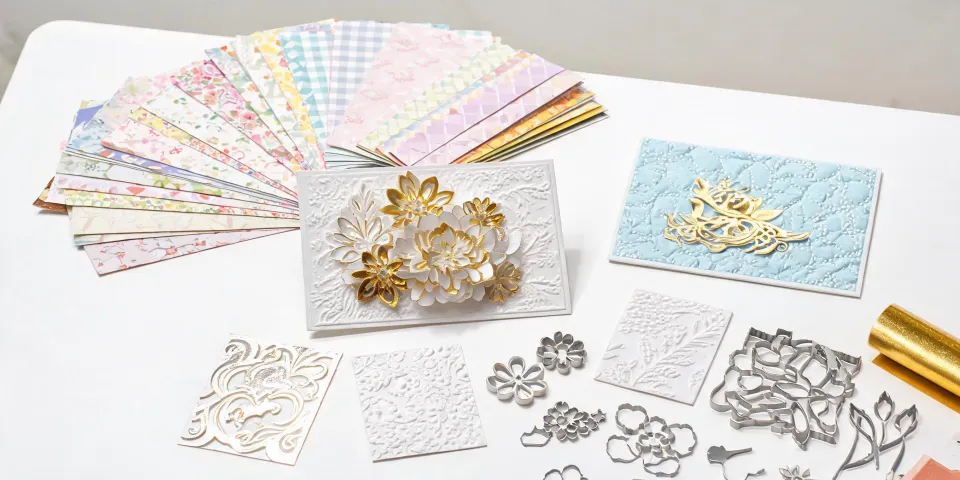
Spellbinders Craft Stax vs. a General Cutting Machine: What I Learned Buying for 600 Holiday Cards
I am the office administrator for a 240-person company. I manage all corporate gifting and print ordering—roughly $180,000 annually across 12 vendors. I report to operations and finance, which means I care about three things: process, internal client satisfaction, and whether the invoice survives an audit.
When I first took over holiday card production in 2021, I assumed a general cutting machine would beat a manual die-cutting system. More automation, right? Three years and about 1,800 cards later, I realized the answer depends on what you are repeating.
Here is the comparison I wish I had: Spellbinders Craft Stax plus Spellbinders dies vs. a general-purpose cutting machine for a B2B holiday card and ornament program. I am not comparing brands. I am comparing two workflows. The standards I used: ramp-up, per-unit cost at volume, material and finish, seasonal scalability, greeting card signing and mailing, and risk.
1. Ramp-up and skill threshold
With Spellbinders Craft Stax, the learning curve is tactile. You learn pressure, plate stacking, die placement, and how different cardstocks behave. If you buy a Spellbinders Christmas cards die set, the design is already engineered. You are not designing from scratch. That matters when your team has turnover and you need someone else to reproduce the same card next November.
A general cutting machine is different. You need software, design files, blade settings, mats, and calibration. If you have a graphic designer on staff, this can be faster for custom work. If you do not, the software troubleshooting can eat an afternoon. (I once spent two hours on a blade setting that looked correct but wasn't.)
Comparison conclusion: For repeat seasonal motifs, Spellbinders Craft Stax was easier to train on. For one-off custom vector shapes, the general cutting machine won. The unexpected part: automation does not remove manual assembly. From the outside, a cutting machine looks like a set-and-forget robot. The reality is someone still weeds, glues, layers, and signs.
2. Per-unit cost at 500 to 800 pieces
At our volume, the math changed in year two. Spellbinders Craft Stax has a higher upfront cost—machine plus dies—but the dies are reusable. If you run 600 cards annually, the per-unit cost drops each year you reuse the same dies. The general cutting machine has a lower entry point, but blades, mats, and time add up. Files are reusable; consumables are not.
I want to be honest here: if you need 100 cards once, neither workflow beats an online printer. The 'always make it in-house' advice ignores labor. Our fully loaded internal cost for 600 layered cards was competitive only because we spread the machine and die cost across three seasons.
Comparison conclusion: Spellbinders Craft Stax wins for recurring programs above roughly 400 pieces per year. A general cutting machine wins for variable designs under 200 pieces, or when you already own the software and staff time.
3. Material, finish, and the Christmas ornament question
Spellbinders Christmas cards are built for layered paper. The Spellbinders ecosystem gives you coordinated dies, embossing folders, and cardstock-friendly designs. If your goal is a dimensional card with a die-cut ornament on the front, Spellbinders Craft Stax is the cleaner path. You get repeatable registration across hundreds of cards.
A general cutting machine can cut shapes a die cannot easily do, and it handles vinyl, felt, and some thicker materials. For a Christmas ornament made from acrylic or wood, neither a manual die cutter nor a standard craft cutter is always the right tool. That may be an outsourced laser job. I should add that we tested paper ornaments with Spellbinders dies and they looked better than expected—but they are not hard plastic ornaments.
Comparison conclusion: Choose Spellbinders Craft Stax for paper Christmas cards and paper Christmas ornament projects. Choose a general cutting machine for custom materials and non-paper shapes. If you need 150 engraved acrylic ornaments, do not force either workflow.
4. Seasonal scalability
Spellbinders seasonal collections reduce design time. You buy into a look—City Holiday, Classic Mouse, or a Christmas card die set—and you can reproduce it. The downside is storage. Dies take space, and you need to label them so next year's team can find them. (Label the packaging, not just the die. Trust me.)
A general cutting machine scales through files, not physical dies. That is great for customization. But file management becomes its own project. If your designer leaves, someone has to understand the layers, fonts, and cut settings. For a B2B team, I found standard dies easier to hand off.
Comparison conclusion: Spellbinders Craft Stax wins for a repeatable annual holiday program. A general cutting machine wins when every client needs a different design. Most companies need both habits: standardize the base card, customize the insert or tag.
5. How do you sign a greeting card etiquette? The dimension nobody budgets for
This is where the machine choice almost stops mattering. You can produce a perfect Spellbinders Christmas card and still undermine it with a careless signature. For corporate cards, the etiquette I use is practical:
- Use blue or black ink. Pencil looks unfinished; glitter pen can look informal for client gifts.
- For clients you know, sign first names and add one specific line. 'Hope your January slows down' beats 'Best wishes' because it sounds human.
- For new contacts, include your full name, title, and company. Do not assume they remember who you are.
- For a mixed list, avoid defaulting to a religious message. 'Happy Holidays' or 'Season's Greetings' is safer unless you know the recipient celebrates Christmas.
- Hand-sign as many as possible. If volume makes that impossible, print the signature but add a handwritten note to your top 10 to 15 percent of accounts.
- Check names and titles twice. Misspelling a client's name is worse than sending a plain card.
- If an executive signature is expected, get approval before printing it. A pre-printed executive signature without permission is a compliance problem, not a time-saver.
Then there is mailing. A layered card or a card with a Christmas ornament attached can change your postage class. According to USPS (usps.com), standard letter dimensions run from 3.5 by 5 inches minimum to 6.125 by 11.5 inches maximum. Thickness matters too. USPS pricing effective January 2025 lists First-Class Mail letter 1 oz at $0.73, large envelope 1 oz at $1.50, and additional ounce for large envelopes at $0.28. Source: usps.com/stamps.
If you make a 6 by 6 inch card with a bow, you may move from letter to large envelope pricing. That is more than double the postage before you add the ornament.
Comparison conclusion: Neither machine signs the card. Spellbinders Craft Stax gives you a blank, high-quality interior that is pleasant to hand-sign. A general cutting machine can print signatures, but printed signatures can feel impersonal at scale. The real decision is how many cards your executives will actually sign.
6. Risk, support, and invoicing
In 2022, I tried a low-cost print vendor for holiday cards. The price was great—about 30 percent lower than our regular supplier. They could not provide a proper invoice, only a handwritten receipt. Finance rejected the expense report, and I had to cover $1,150 from the department budget. Now I verify invoicing capability before placing any order.
With Spellbinders, the risk is more about storage and replacement plates than software. With a general cutting machine, the risk is consumables and file compatibility. Both need a backup plan. If your only trained operator is out the week before the holiday party, you are in trouble either way.
Comparison conclusion: Spellbinders Craft Stax is easier to standardize across staff. A general cutting machine is easier to customize but harder to hand off. Choose based on your team, not the spec sheet.
What I would choose now
There is no best machine. There is a best workflow for your volume, design consistency, and signing capacity.
Choose Spellbinders Craft Stax if: you run a recurring holiday card program, make 400 or more cards or paper ornaments per year, want coordinated Spellbinders Christmas cards, need repeatable layered designs, have at least one craft-fluent staff member, and can store dies.
Choose a general cutting machine if: you need custom vector shapes, vinyl or mixed materials, one-off client gifts, already have a designer, or your designs change every year.
Choose neither if: you need 50 to 100 cards once, no one can assemble them, your executives must hand-sign every card, or you need same-day delivery. Outsource to a local printer or letterpress shop. That is not a failure. It is procurement.
For our 2024 vendor consolidation project, we kept Spellbinders Craft Stax for the standard Christmas card and paper ornament line, and we kept a general cutting machine for custom client logos. That is the honest answer for most B2B teams: standardize where you can, customize where it matters, and leave time for the signatures.