-
Don't Buy a Die Cutting Machine Until You Read This
-
Who Am I to Talk?
-
Mistake #1: I Bought the Machine, Not the System
-
Mistake #2: I Ignored Paper Compatibility — And Wasted Hundreds
-
Mistake #3: I Didn't Plan for Seasonal Products — And Missed Q4
-
When a Simpler Machine Is Actually Enough
-
What I'd Tell My Younger Self
Don't Buy a Die Cutting Machine Until You Read This
The most expensive die cutting machine isn't the one with the highest price tag — it's the one that locks you into a limited ecosystem with expensive, incompatible dies and no seasonal support. I learned this the hard way: three machines in two years, about $3,200 in wasted equipment and materials, and a shelf full of dies I can't use anymore.
If you're sourcing for a retail shop, a corporate gifting program, or a craft business, here's the short version: buy into a system, not a machine. The machine is the entry point. The dies, the templates, the seasonal collections, and the technical support are where the real value — or the real cost — lives.
Who Am I to Talk?
I handle procurement for a mid-size gifts and stationery retailer — we sell greeting cards, holiday ornaments, and custom paper crafts to corporate clients. Been doing this for about 6 years now. (Maybe 7, I'd have to check my start date.)
In that time, I've personally made — and documented — 12 significant equipment and material mistakes, totaling roughly $8,700 in wasted budget. Most of it came down to bad assumptions about die cutting machines and the systems around them. Now I maintain our team's equipment checklist to prevent others from repeating my errors.
(Note to self: I really should publish that checklist publicly. Maybe next quarter.)
Mistake #1: I Bought the Machine, Not the System
The assumption: A die cutting machine is a die cutting machine. Pick one with good reviews and a decent price, and you're set.
The reality: The machine is the cheapest part. The dies are where the cost — and the compatibility trap — lives.
In 2021, I bought a popular entry-level machine from a well-known brand. Paid about $180. Seemed like a no-brainer. Then I started ordering dies — and realized the brand's proprietary dies were 30-40% more expensive than comparable options from other manufacturers. Worse, they didn't work with other machines. I was locked in.
That first year, I spent about $1,200 on dies and accessories for that machine. When the machine broke (plastic gears, go figure), none of those dies worked with the replacement I wanted from a different brand. Straight to the trash — or, well, they're still sitting in a box in storage because I can't bring myself to throw them away. (Which, honestly, is almost worse. It's a daily reminder.)
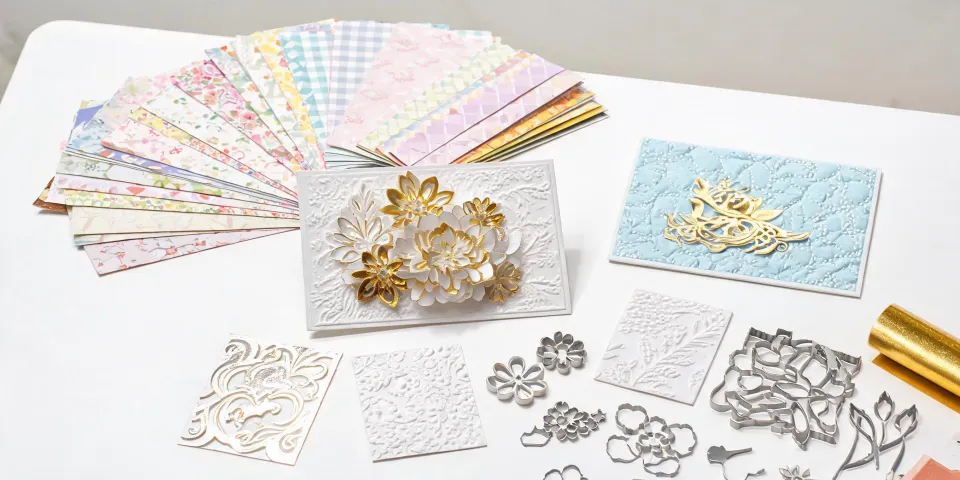
What I should've done: Looked at the ecosystem first. Spellbinders, for example, has the Platinum series that works with a wide range of dies, including many third-party options. Their dies are compatible across multiple machines in their lineup. That flexibility means you're not starting from scratch every time you upgrade or replace a machine.
"People think the machine is the investment. Actually, the ecosystem is the investment. The machine is just the entry point."
Mistake #2: I Ignored Paper Compatibility — And Wasted Hundreds
The assumption: Any paper works in any die cutting machine. It's just cutting, right?
The reality: Paper weight, finish, and moisture content dramatically affect cut quality. Using the wrong paper can tear, jam, or dull your dies prematurely.
In early 2022, I ordered 500 sheets of a specialty cardstock for a Christmas ornament project — beautiful, textured, heavy stock. The supplier assured me it was "die cutting compatible." Spoiler: it wasn't. (Surprise, surprise.)
The first 50 sheets jammed the machine, ruined two dies, and produced ornaments with ragged edges that looked handmade in the worst way. Total loss: about $340 in materials plus $120 in die replacements. And we missed our delivery deadline by 10 days.
What I learned: Different machines handle different paper types differently. The Spellbinders Platinum 6, for instance, has adjustable pressure settings that let you dial in exactly what your paper needs. That's not a luxury — it's a requirement if you're working with varied materials for greeting cards, ornaments, or mini photo books.
From the outside, it looks like vendors just need to work faster for rush orders. The reality is rush orders often require completely different workflows and dedicated resources — and the same goes for die cutting. Different materials need different machine setups.
Mistake #3: I Didn't Plan for Seasonal Products — And Missed Q4
The assumption: I can buy a few Christmas dies in October and be ready for holiday orders.
The reality: Seasonal product development needs to start months earlier — and your die cutting system needs to support the volume and variety.
September 2022. A corporate client wanted 800 custom Christmas ornaments — a mix of 4 designs, with matching greeting cards. We had the machine. We had the paper. What we didn't have was the right dies for the ornament shapes, and the ones we ordered took 6 weeks to arrive. By the time we could start production, the client had already found another supplier. That order was worth $4,200. We got $0.
Here's what I should have known: Spellbinders releases their seasonal collections — like City Holiday and Classic Mouse — months in advance. Their die sets are designed to work together across projects, so you can create a cohesive holiday line without reinventing the wheel each year. That kind of planning support is invaluable for B2B operations.
People assume expensive vendors deliver better quality. Actually, vendors who deliver quality can charge more. The causation runs the other way. Spellbinders' pricing is transparent — you see the machine cost, the die cost, and the kit cost upfront. No hidden fees for "premium" dies or "expedited" shipping on seasonal items. That predictability matters when you're planning production budgets.
Today, we use Spellbinders machines for nearly all our greeting card and ornament production. We've standardized on the Platinum 6 and Scout machines, and we plan our seasonal die orders 4-5 months in advance based on their published collection calendars. (I should add that we also keep a buffer of popular dies — learned that lesson after a last-minute rush order in 2023.)
When a Simpler Machine Is Actually Enough
Alright, let me be honest: not every operation needs a Platinum 6. If you're doing small-batch, single-layer cuts on standard cardstock, a simpler machine will do the job. I've seen small Etsy shops run perfectly well on entry-level machines for years.
Here's where I draw the line: If you're handling B2B orders with consistent volume, multiple product lines, or seasonal peaks, the ecosystem matters. The ability to switch between materials, access a wide die library, and plan around seasonal collections isn't a luxury — it's what keeps your production on schedule and your costs predictable.
Business card pricing comparison (500 cards, 14pt cardstock, double-sided, standard 5-7 day turnaround): Budget tier: $20-35, Mid-range: $35-60, Premium (thick stock, coatings): $60-120. Based on publicly listed prices, January 2025. Prices exclude shipping; verify current rates. The same principle applies to die cutting: the cheapest option upfront often costs more in the long run when you factor in rework, waste, and missed deadlines.
What I'd Tell My Younger Self
If I could go back to 2021 with what I know now, I'd tell myself three things:
- Buy the system, not the machine. Look at die compatibility, ecosystem breadth, and upgrade paths before you look at price.
- Test materials before you commit. A 10-sheet test run can save you from a 500-sheet disaster.
- Plan seasonal production 4-6 months ahead. The vendors who release collections early — like Spellbinders with their seasonal lines — are giving you a competitive advantage. Use it.
Oh, and one more thing (should mention this): build relationships with suppliers who are transparent about what they charge. The vendor who lists all costs upfront — even if the total looks higher on paper — will almost always cost you less in the end. I've learned to ask "what's NOT included" before I ask "what's the price."
That's my story. Hope it saves you a few thousand dollars and a lot of frustration. (Mental note: update the equipment checklist this weekend.)