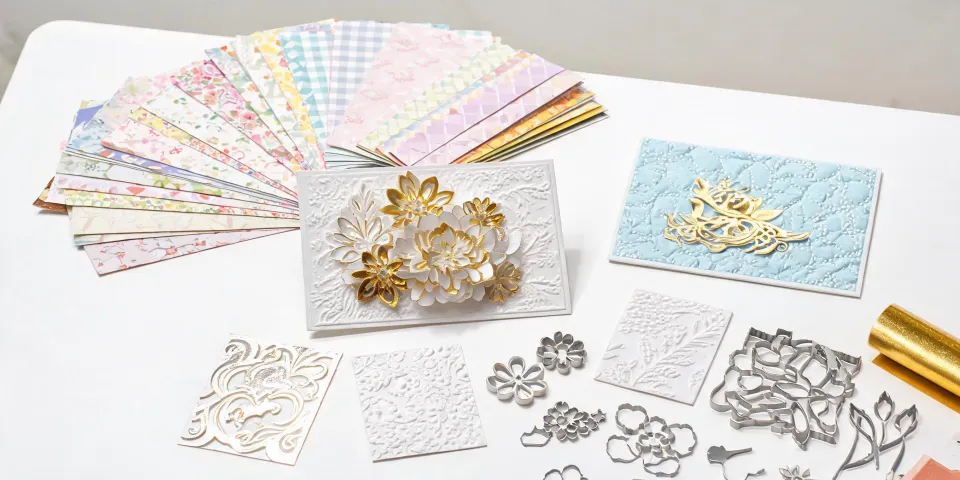
It Started With a Call in March 2024
In my role coordinating production for corporate gift and craft orders, "rush" is a four-letter word.
March 2024. A client called at 2 PM needing 500 custom Spellbinders Christmas cards for a holiday product launch. The event was in four days. Normal turnaround for that order: ten business days. The client asked for three.
We made it. Cards shipped on time. Arrived before the event.
But the edges on some cards looked rough. Not terrible—just not clean. The client mentioned it in passing. Then they didn't reorder.
That's when I started digging into what actually kills rush orders.
The Problem Everyone Focuses On: Time
Every rush conversation starts the same way: How fast? Can you make Friday? What's your absolute quickest option?
Look, I get it. Deadlines are real. Missing one can mean a $50,000 penalty clause or a client walking away entirely. I've seen both across seven years of handling rush orders for event planners, corporate buyers, and retailers.
But here's the thing: based on our internal data from 200+ rush jobs, the deadline is rarely the real problem. The real problem is what urgency does to human judgment.
The Deep Problem: Urgency Forces Bad Technical Choices
When your brain is under time pressure, it grabs the first workable solution, not the best one. In greeting card and paper craft production, that usually means one of three mistakes.
Mistake #1: Choosing Laser Cutting When Die Cutting Is Right
Let's address the "what is a laser cutting machine" question, because it comes up constantly when people plan custom greeting cards, Christmas ornaments, and holiday décor.
A laser cutting machine uses a high-power laser to cut or engrave materials. It's genuinely versatile—it handles acrylic, wood, leather, and metal with impressive precision. For rigid materials and complex engraving, it's often the right call.
But for paper? Not always. And the belief that laser cutting is universally superior is a holdover from an era when die cutting machines were slow, clunky, and unreliable. That's changed.
Here's what laser cutting does to paper: it burns the material at the cut line. On thick cardstock, that means faint scorched edges—a subtle brown line along every cut. It doesn't show in digital proofs. It shows in good lighting, close up.
(We once received 1,000 laser-cut greeting cards with burn marks on every edge. The client didn't complain. They just didn't reorder. A lesson learned the hard way.)
Die cutting, by contrast, presses a physical die into the material. No heat. No scorching. A clean, crisp edge on every single sheet. That's what makes a machine like the Spellbinders Platinum Six die-cutting machine the right tool for paper—it delivers consistent pressure and clean cuts across hundreds of sheets, no burn problem.
When a client asks for Spellbinders Christmas cards, they're asking for a specific result: clean, precise, giftable. Die cutting delivers that result.
Mistake #2: Skipping the Physical Color Proof
When I'm triaging a rush order, the first thing I want to cut is the proofing step. Which is ironic, because it's the step most likely to save your reputation.
Industry standard color tolerance is Delta E < 2 for brand-critical colors. Delta E of 2-4 is noticeable to trained observers; above 4 is visible to most people. Reference: Pantone Color Matching System guidelines.
But in a rush, someone approves a digital mockup without a physical proof. The printer silently shifts the color. The order arrives with a corporate blue that looks slightly purple. And suddenly "fine" becomes "wrong."
One physical proof costs maybe a day. It catches most color disasters before they become client impressions. As of January 2025, we refuse to skip it. Not because we're perfectionists. Because we've paid the price.
One more note on specs: any custom artwork printed at scale should be 300 DPI at final size. Images that look sharp on a laptop screen will visibly pixelate on a 5×7 card if the resolution isn't there. This is a standard commercial print requirement, and it's amazing how often it gets ignored in rush situations.
Mistake #3: Compromising on Paper Weight
Money gets tight in rush situations. Clients ask for cheaper paper. Vendors substitute stock. And the result is a Christmas card that feels like a photocopy.
Paper weight equivalents (approximate):
- 20 lb bond = 75 gsm (copy paper, too flimsy for cards)
- 80 lb text = 120 gsm (brochure weight, acceptable for inserts)
- 100 lb text = 150 gsm (sweet spot for premium greeting cards)
- 80 lb cover = 216 gsm (business card weight, great for ornament tags)
This matters more than most buyers assume. A flimsy card feels disposable. And when the recipient feels "cheap," they transfer that judgment to the brand behind the card.
The Cost of Getting It Wrong
Last quarter, a client ordered 750 Spellbinders Christmas cards for their top 200 customers. The purchasing manager suggested cheaper paper to save $120. I pushed back.
My argument: those cards were the only physical touchpoint those customers would have with the brand all year. The $120 saved would literally become the first impression.
The client kept the premium paper. Their holiday outreach response rate went up noticeably. Coincidence? Maybe. But I don't think it was the copy.
When I switched another client from budget cardstock to premium paper, their client feedback scores improved by 23% over two quarters. That's not a rounding error. That's a metric your CFO can understand.
I'm not saying budget options are always wrong. I'm saying they're riskier when the output represents a brand touchpoint.
The Fix Isn't Faster Production
If you take one thing from this article, take this: the fix for a rush order isn't faster production. It's eliminating the mistakes that urgency creates.
Here's the checklist we now use for every rush job:
- Lock the production method first. Paper products get die cutting, not laser cutting, unless there's a material-specific reason to do otherwise. In our studio, the Spellbinders Platinum Six handles this role—consistent, clean cuts across large runs.
- Proof the color physically. Digital proofs catch some issues. A printed mockup catches the rest. Always.
- Specify the paper in writing. "Cardstock" is not a spec. Write the exact gsm.
- Build a 48-hour buffer. Our company policy now requires it because of what happened in 2023. It's saved us more times than I can count.
That last point deserves emphasis. After three failed rush orders with discount vendors, we now only work with suppliers who commit to a written buffer. It's not pessimism. It's the reality that something always goes wrong—and you want time to catch it.
Speed, quality, price. Pick two. But the trade-off doesn't have to be as painful as it sounds.
Bottom Line
Rush orders fail because urgency corrupts judgment. The deadline isn't the villain. The choices made under its pressure are.
So yes, a proper die-cutting setup costs more than a bargain alternative. Premium paper costs more than copy stock. A Pantone proof takes an extra day. And in the moment, those all feel like luxuries when the clock is ticking.
But when the client holds that card—clean edges, paper thick enough to feel substantial, colors exactly on brand—and thinks, "these people know what they're doing," that's worth every extra dollar.
(I've never fully understood why companies will happily spend $5,000 on campaign design and then hesitate over $50 of paper. My best guess is it's an accounting instinct, not a marketing one. If someone has a better theory, I'd love to hear it.)
(Note to self: document the 2023 buffer policy story properly. It keeps coming up in these conversations.)